blog
How to start a trading journal with 20 trades
Set up a trading journal, review the first 20 closed trades, and decide which fields and checks deserve a place in the next cycle.
7 mnt membacaDennis Jahn#Jurnal trading
Terjemahan ini belum tersedia — Anda membaca aslinya di English.
Start a trading journal with one account, one timezone, a short trade note, and an explicit reviewed state. Run that setup for 20 closed trades before you add fields or change the review process.
The 20-trade boundary is a workflow limit, not proof that a strategy works. It gives you enough records to test whether the journal stays complete and usable. It does not make the sample statistically reliable or predict what the next trade will do.
Define the first cycle
Write down the scope before you record the first trade:
| Setting | Decision to record |
|---|---|
| Account | Use one account for the first cycle. |
| Trade status | Include closed trades only. |
| Timezone | Choose the IANA timezone that defines each trading day. |
| Completion | Stop after 20 closed trades have complete records and a finished process review. |
| Review outcome | Keep, change, or remove one part of the journal after you inspect the complete set. |
Do not exclude a trade because its result is inconvenient. If a trade belongs to the declared account and closes during the cycle, keep it in the set. If its source data is incomplete, label it incomplete and fix the record before the final review.
One account keeps the first setup easy to audit. You can add more accounts later, but each account may have different instruments, currencies, fee rules, and import behavior. Combining them before you can verify one clean record makes errors harder to locate.
Separate the record from the note
A journal holds several kinds of information. Keep them separate because they change for different reasons.
| Information | Examples | Owner |
|---|---|---|
| Imported | Executions, timestamps, quantity, prices, fees | The broker import or another source record |
| Calculated | Average prices, realized result, trade duration | The journal calculation based on the stored trade |
| User-entered | Setup, plan, rule check, deviation note | You |
| AI-generated | A summary or suggested pattern | The model output, clearly labeled and open to verification |
Do not copy imported or calculated values into a paragraph. A later import correction can update the trade while the copied number remains wrong. The note should add context that the source record cannot provide.
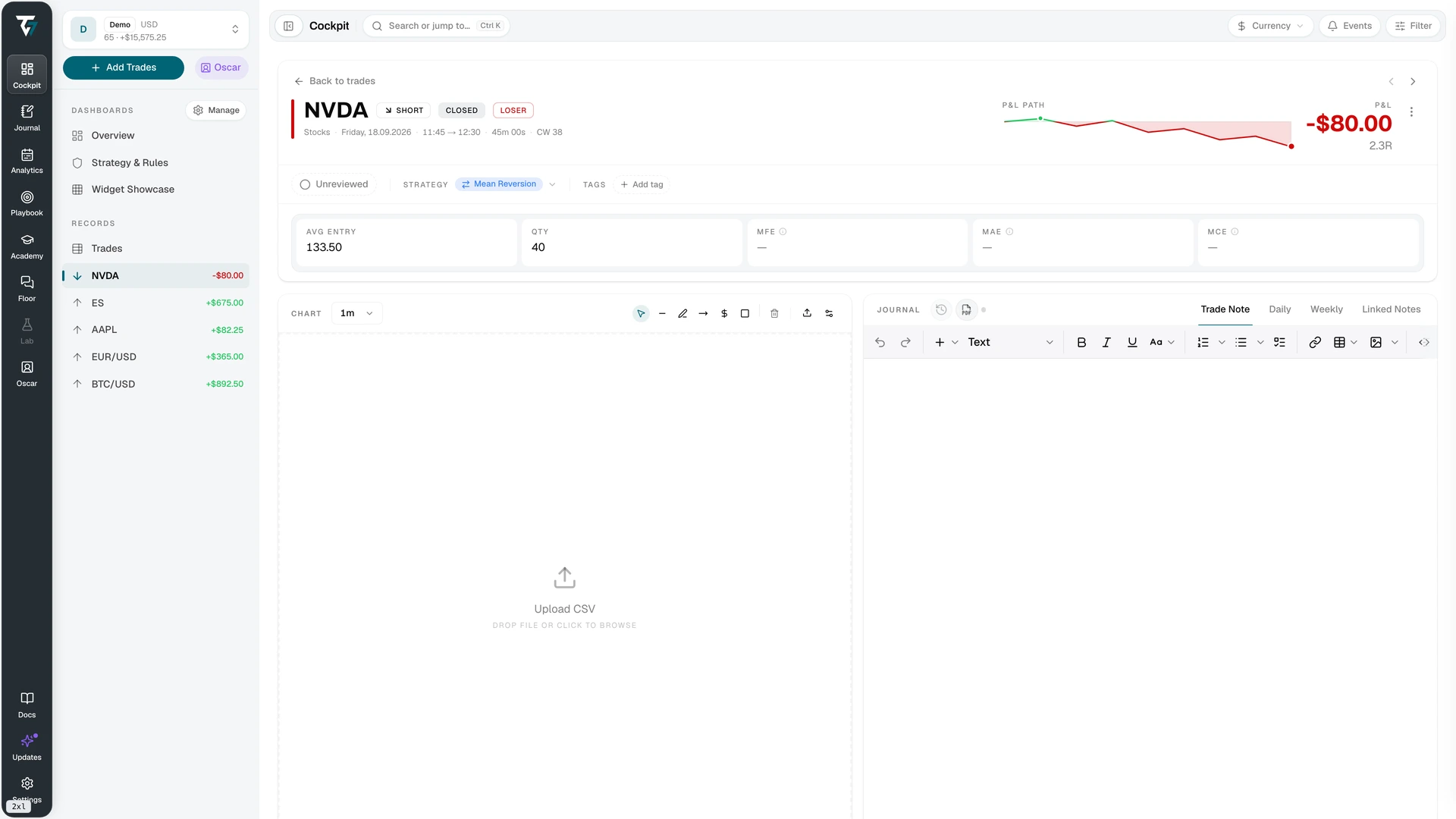
View the trade record and note at full size.
For the first cycle, use this short note:
Setup:
Planned condition:
Invalidation condition:
Rule followed? Yes / No / Not applicable
Deviation, if any:
Evidence to revisit:
This is intentionally smaller than a complete trade review template. The first cycle tests whether you can finish the review consistently. Add detail only after the 20-trade review shows that a missing field blocks a real decision.
Review each closed trade
Use the same sequence for every trade.
1. Verify the source record
Check the account, instrument, direction, quantity, executions, timestamps, fees, and realized result. Confirm that partial fills and later corrections belong to the same trade where appropriate.
Do not continue as if the record were complete when an execution or fee is missing. Mark the problem, correct the import, and return to the trade. A calculated value can be arithmetically correct while its input set is incomplete.
2. Add only missing context
Record the setup, the planned condition, and the invalidation condition. Then record whether the execution followed the relevant rule. If it did not, name the observed deviation without grading the trade as good or bad.
A profitable result does not prove that the process was followed. A loss does not prove that it was broken. Keep the process check separate from the outcome.
3. Attach the evidence
Add the chart, image, or linked note that you will need during the final review. A label without supporting context may be hard to interpret after another 19 trades.
Use consistent setup and rule names. If two labels mean the same thing, choose one before you continue. Do not rename historical records silently. Record the correction so the final grouping remains reproducible.
4. Mark the trade reviewed
Use an explicit reviewed state. This creates a queue with two clear groups: trades that still need work and trades whose source record and process check are complete.
A note is not the same as a completed review. The reviewed state should mean that you verified the record, added the required context, recorded the rule check, and attached the evidence you intend to use later.
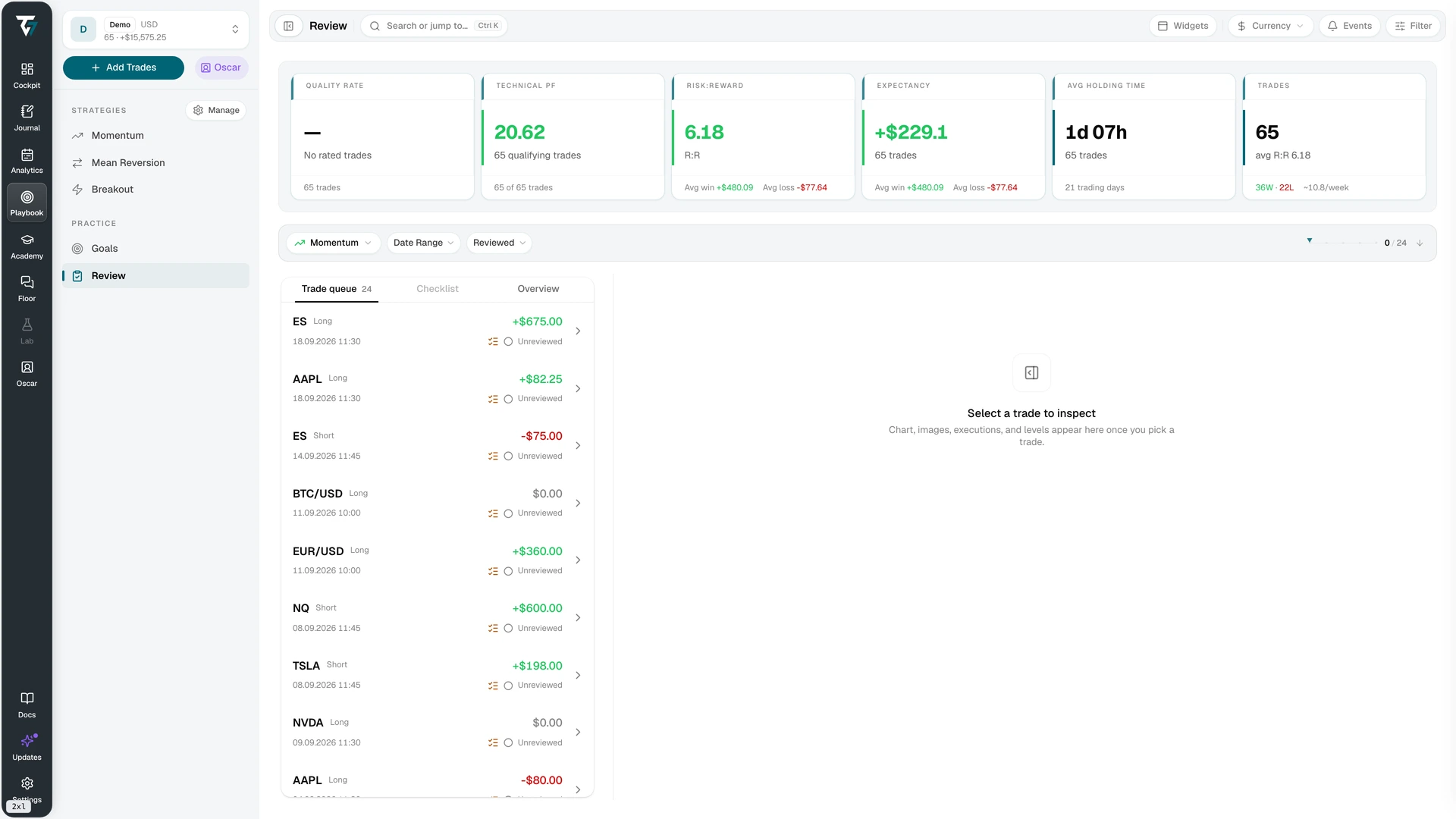
View the review queue at full size.
Check the journal every five trades
After trades 5, 10, and 15, inspect the journal for operational problems. Do not draw a strategy conclusion yet.
Check these items:
- Every trade in scope appears once.
- No trade remains marked reviewed when its source record is incomplete.
- Setup and rule labels use the same names throughout the cycle.
- The note does not duplicate fields already stored on the trade.
- The unreviewed queue matches the work that remains.
- The account and timezone still match the scope you recorded at the start.
Fix missing records and inconsistent labels as soon as you find them. Keep the note structure unchanged unless a field is impossible to complete or clearly duplicates existing data. The final review needs a stable format across the set.
Review all 20 trades as one set
When the twentieth trade is complete, verify that the full set uses the same account, timezone, status, and filters. Resolve any incomplete imports before you accept an aggregate result.
Then review the set in this order.
Check completion
Count the closed trades, reviewed trades, incomplete records, and unresolved corrections. If the set does not contain 20 complete and reviewed trades, finish the missing work before interpreting it.
Group by the decisions you recorded
Group the trades by setup and by rule result. Use the stored trade fields for calculations and the journal notes for context. Do not copy a result into a new spreadsheet unless the journal cannot reproduce the view you need.
Look for a question that the records can answer. For example:
- Which rule was marked as not followed most often?
- Which setup labels were too vague to apply consistently?
- Which note prompt stayed blank because it added no review value?
- Which incomplete source fields prevented a trade from being checked?
These questions test the journal and the review process. They do not ask the small sample to prove a trading edge.
Trace one observation back to its trades
Choose one observation and open every trade that supports it. Confirm that the account, filters, calculation inputs, notes, and attached evidence agree.
If you cannot reproduce the observation, do not turn it into a rule. Record what is missing. The next cycle can collect the needed field or use a clearer label.
Make one journal decision
End the cycle with one decision about the journal itself:
| Decision | Use it when |
|---|---|
| Keep | The current field or check supported the review without duplicate entry. |
| Change | A missing or ambiguous field blocked a question you needed to answer. |
| Remove | A field stayed unused, duplicated another record, or had no defined review use. |
Changing one item keeps the next cycle comparable with the first. Record the reason and the date. If the evidence supports no change, keep the journal as it is.
How Tradeways supports the cycle
Tradeways keeps imported trade records, calculated values, and journal notes in separate parts of the same workflow. Trade Detail connects executions, levels, images, custom fields, calculated summaries, and linked journal context. Journal supports trade, daily, weekly, and session entries with reusable templates and version history.
The Review workspace applies the selected account and filters to a trade queue. It shows which trades are reviewed and which still need work. Strategy rules can include automatic checks from the trade record and manual checks that you complete during review.
That structure lets you run the 20-trade cycle without maintaining a second completion list or copying calculated results into the note.
Start the next cycle
Keep the same scope for the next 20 trades unless the first cycle showed that the scope itself prevented a useful review. Apply the one journal change you selected, then repeat the same completion checks.
Use the trading journal fields guide when a missing structured field blocked the review. Use the four review templates when you are ready to add daily, weekly, or session context. If you are evaluating software first, run the day trading journal test.
Journal records describe past trades. They do not predict the next result or guarantee that a process change will improve performance. Read the Tradeways risk disclosure before using journal findings to support a trading decision.
Trading mengandung risiko. Tradeways menyediakan perangkat lunak jurnal dan analitik, bukan nasihat investasi. Baca pengungkapan risiko.
Terkait
Cara memilih jurnal perdagangan harian
Uji jurnal perdagangan harian melalui satu siklus tinjauan lengkap: data sumber, tinjauan transaksi, konteks harian, dan keputusan mingguan yang dapat dilacak.
6 mnt membaca
Cara membuat jurnal perdagangan di Notion
Buat jurnal perdagangan Notion dengan basis data transaksi dan tinjauan yang saling terhubung, kolom sumber yang jelas, templat yang dapat digunakan kembali, dan validasi mingguan.
7 mnt membaca
Templat jurnal perdagangan untuk empat siklus tinjauan
Salin templat praktis untuk tinjauan transaksi, harian, mingguan, dan sesi, lalu sesuaikan setiap templat dengan keputusan yang perlu didukung.
5 mnt membaca