Blog
How to choose a day trading journal
Test a day trading journal against one complete review loop: source data, trade review, daily context, and a traceable weekly decision.
7 min readDennis Jahn#Journaling
Choose a day trading journal by testing one complete review loop. The journal should preserve the trade record and show which trades still need review. It should also hold the context for a day or session and trace a weekly conclusion back to the underlying trades.
Do not start with the longest feature list. Start with five questions:
| Test | What the journal must show |
|---|---|
| Source record | Executions, fees, timestamps, account, and instrument remain separate from your notes. |
| Review queue | You can find unreviewed trades without maintaining a second checklist. |
| Time context | Trade, daily, session, and weekly notes answer different questions. |
| Reproducible scope | The account, timezone, filters, and date range behind a result remain visible. |
| Recovery | You can correct an import, restore a note, and identify incomplete data without losing the earlier record. |
A journal that passes these tests keeps the record and review connected. A journal that only stores screenshots and paragraphs may still be useful, but you will have to rebuild those links yourself.
Run a one-week journal test
Use a normal trading week. Do not redesign your entire process for the trial. The goal is to see whether the journal reduces missing context and duplicate work.
1. Record the source data once
Start with the execution record. Confirm that each closed trade has the correct account, instrument, direction, quantity, entry and exit times, prices, fees, and realized result. If the journal imports trades, check how it handles partial fills, corrections, and trades that span multiple executions.
Keep source data separate from your own observations. A fill price belongs to the trade record. Your reason for taking the trade belongs to the note. If you copy calculated values into free text, the note can disagree with the record after an import correction.
Mark any incomplete import before you review the result. A weekly total built from missing trades is provisional, even when the arithmetic is correct.
2. Review trades from a queue
The journal should answer a simple operational question: which trades still need review?
Use a reviewed state or a saved filter instead of a separate spreadsheet or task list. Open an unreviewed trade and compare the plan with the execution. Record any rule checks, then move to the next trade. Confirm that you can return to a reviewed trade without changing its source record.
The queue should also handle recovery. If a filter changes or a trade leaves the current list after you mark it reviewed, the open record should not disappear before you finish. Empty states should tell you whether the work is complete or whether the current account and filters exclude the trades you expected.
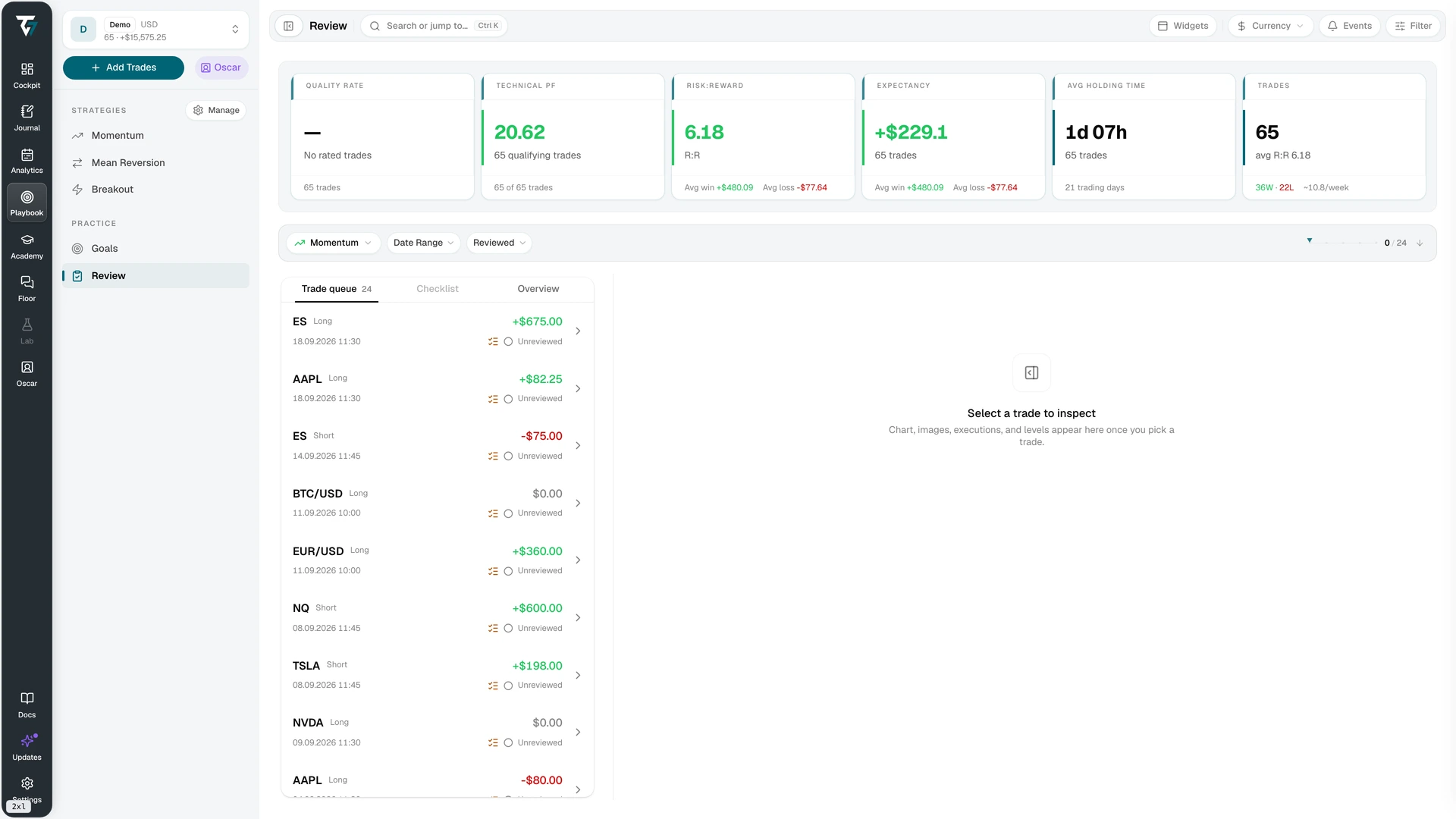
Open the review queue screenshot at full size.
3. Keep the trade note short
A trade note should add context that the execution record cannot hold. Use it for the planned setup, the condition that invalidated the idea, relevant charts, and observed deviations. Do not rewrite prices, fees, quantity, or calculated P&L.
The related guide to trading journal fields separates structured fields from free-text notes. The trade review template gives you a copy-ready structure for the first pass.
During the trial, count how often you have to enter the same fact twice. Repeated manual entry is a sign that the journal is not connecting its records.
4. Add daily and session context
At the end of the day, write what repeated across the reviewed trades. Keep the daily entry separate from the trade notes. It should describe the set, not retell each trade.
Use a session entry when a bounded time range matters more than the calendar day. Record its start, end, and timezone. A label such as "morning" is not enough when an account, an import, or another reviewer uses a different timezone.
Check whether the journal can show the relevant trades beside the daily or session entry. If you have to search for every trade again, the wider review will become a manual reconstruction.
5. Trace one weekly decision back to evidence
At the end of the week, choose one observation from the daily or session entries. Narrow the trade set by the relevant account, setup, instrument, or time window. Confirm that the same scope applies to the trade list and the calculated summary.
Write one decision and link it to the reviewed trades that support it. You might keep a rule unchanged, inspect a larger sample, correct missing data, or test a narrower condition next week. A weekly review does not need to force a change.
This trace is the pass-or-fail test. If you cannot move from the weekly statement back to the source trades, the conclusion has no audit path.
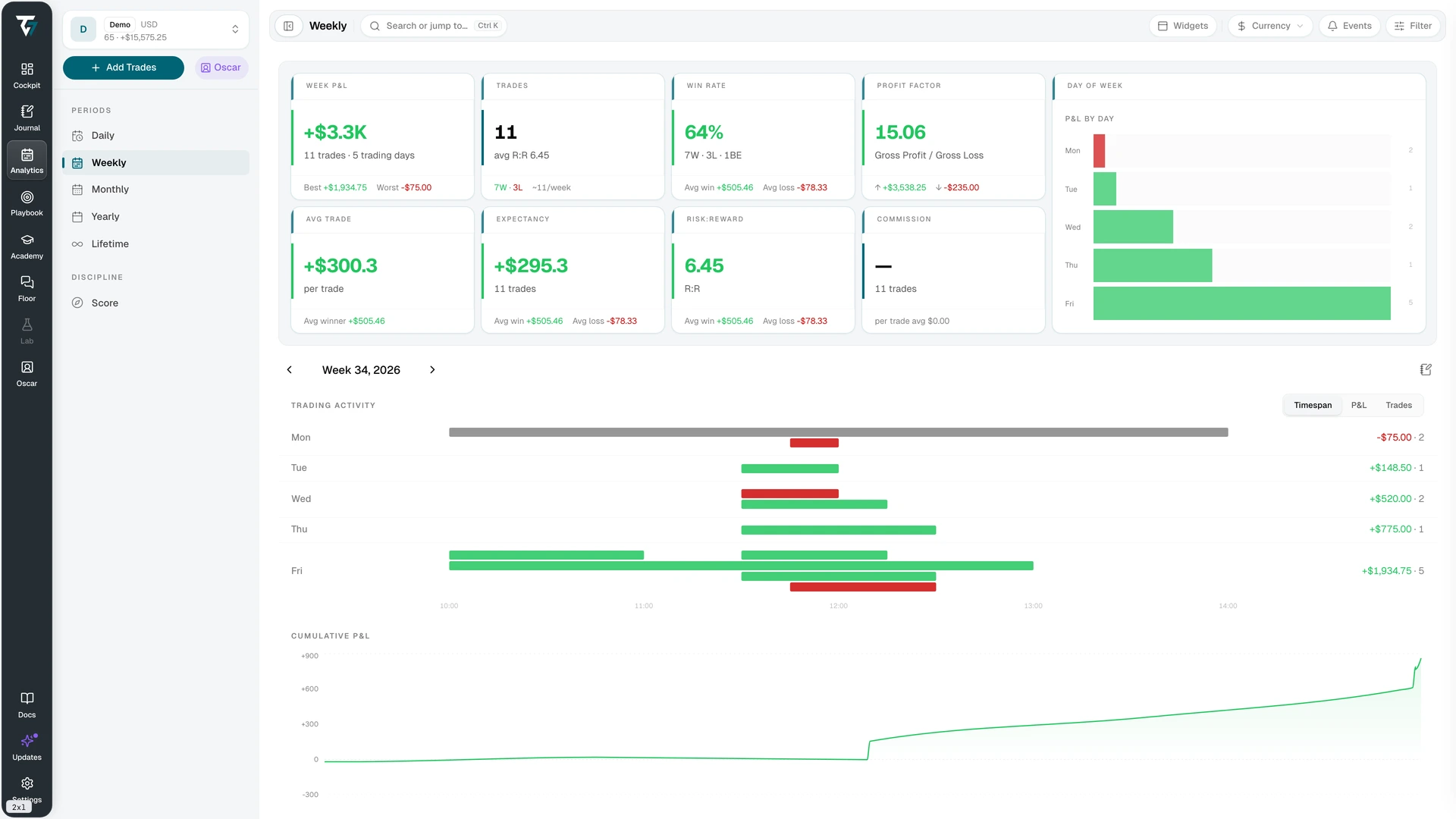
Open the weekly view screenshot at full size.
Separate facts, calculations, and observations
A useful journal shows where information came from because each type changes differently.
| Information | Examples | What should happen when it changes |
|---|---|---|
| Imported | Executions, timestamps, fees | A correction updates the source record and identifies the import state. |
| Calculated | Average price, P&L, win rate | The value recalculates from the corrected trade set. |
| User-entered | Plan, rule check, review note | The note stays attached to its author and review period. |
| AI-generated | Summary or suggested pattern | The journal labels the output and keeps the source trades available for verification. |
This separation matters most when the data is incomplete. A polished weekly summary does not make a failed import complete. The journal should identify the gap and let you rerun the review after the record is corrected.
Check the scope behind every result
Day trading reviews often change scope without announcing it. One screen may show a single account while another combines accounts. A daily boundary may use the exchange timezone, the broker timezone, or the timezone selected in the journal. A dashboard may keep a symbol filter that the trade list does not.
Before accepting a result, verify:
- the account or account group;
- the date range and timezone;
- the included trade status;
- the active setup, instrument, and symbol filters;
- the P&L display unit and currency;
- whether fees and later corrections are included.
The journal does not need to repeat every setting in every paragraph. It does need to show the active scope and apply it consistently to the records and summaries you compare.
Decide after the trial
At the end of the week, keep the journal only if you can answer these questions without reconstructing the process elsewhere:
- Which trades are complete, incomplete, reviewed, and still open for review?
- Can you distinguish imported facts, calculated values, and your own notes?
- Can a daily or session observation be traced to the exact trade set?
- Can a weekly decision preserve its account, filter, currency, and timezone context?
- Can you correct data or restore a note without hiding what changed?
Also record the work the journal added. Count duplicate fields, manual calculations, and places where you maintained the same status twice. A journal can pass the reporting test and still create too much upkeep for daily use.
How Tradeways handles the review loop
Tradeways keeps daily, weekly, session, and trade entries separate. Trade records stay linked to notes, while calculated summaries remain in the relevant period view. The Review workspace filters the trade set and records which trades have completed a process review. The weekly view puts each day's activity, the cumulative result, and the weekly journal in one period.
Version history lets you restore an earlier note. Before the restore, Tradeways saves a backup of the current content. The connected records and period views let you run the one-week test without copying every trade result into a journal paragraph.
Journal evidence does not predict the next trade or guarantee a future result. Use it to preserve the record and make review decisions traceable. Read the Tradeways risk disclosure before using historical results to support a trading decision.
Trading involves risk. Tradeways provides journaling and analytics software, not investment advice. Read the risk disclosure.
Related
How to start a trading journal with 20 trades
Set up a trading journal, review the first 20 closed trades, and decide which fields and checks deserve a place in the next cycle.
7 min read
How to build a Notion trading journal
Build a Notion trading journal with linked trade and review databases, clear source fields, reusable templates, and a weekly validation routine.
8 min read
Trading journal templates for four review cycles
Copy practical templates for trade, daily, weekly, and session reviews, then adapt each one to the decision it needs to support.
5 min read