Trading plan example: write rules you can check trade by trade
A trading plan is a short list of conditions every trade either meets or breaks. Copy a one-page example, rewrite vague lines as checkable rules, and audit your closed trades against it.
We use cookies, including analytics, to improve Tradeways. · Privacy
A trading plan is the written list of conditions under which you take, size, manage, and stop trading. A useful plan fits on one page, and every line is a condition a finished trade either met or broke: "every trade has a recorded stop-loss" instead of "manage risk." Write the plan that way, check each closed trade against it, and change one rule at a time based on what the checks show.
This guide gives you a complete example plan, a table for rewriting vague lines, and a routine for checking trades against the plan afterwards.
A plan answers six questions. Leave out anything that does not change what you do in a session.
Section
The question it answers
Markets
Which instruments and directions do I trade?
Session
When am I allowed to open a trade?
Setup
What has to be true before I enter?
Risk per trade
Where is the stop, how large is the position, what R:R?
Daily limits
When do I stop for the day, whatever the next setup is?
Review
When and how do I check trades against this plan?
A strategy description such as "I buy pullbacks in an uptrend" belongs in the setup section, but it is not a plan by itself. The plan also says how much you risk, when you stop, and how you will find out whether you followed it.
The plan below is illustrative. The instrument, times, and amounts are hypothetical inputs, not recommendations. Replace each with your own numbers.
Every line except the review routine can be answered with yes or no for a finished trade. That is what makes the plan usable later: you can count how often you followed it.
A plan fails the check when its lines describe an attitude, not a condition. Rewrite each line until a trade record, or your own note made at entry, can answer it.
Vague line
Checkable rule
Checked from
Manage risk
Every trade has a recorded stop-loss
Stop level on the trade
Only take good trades
Target at least 2× the stop distance (R:R ≥ 2:1)
Stop, target, and entry
Don't overtrade
Maximum 4 trades per day
Trade count for the day
Don't revenge trade
Stop after 2 losing trades in a row
Results in order
Trade the open
Open trades only between 09:30 and 11:30 New York time
The trade's open time
Respect your daily loss
Stop at a 400 USD loss for the day
The day's P&L
Wait for the setup
Range break, pullback to the edge, trend agrees: noted at entry
Your note, a manual check
A trade record shows whether a stop level exists, not when it was set. If placing the stop at entry matters to you, add a manual check for it.
The last row cannot be read from a trade record. A setup condition depends on what you saw on the chart, so it stays a manual check. Record it at entry, not after you know the result, or the check will drift toward whatever the outcome suggests.
For the R:R line, set the minimum from your own win rate rather than copying 2:1. The risk/reward ratio guide shows how to find the lowest ratio that breaks even at your win rate, and how to check the ratio your exits actually delivered.
Checking a trade means going through each rule and marking it passed, failed, or not applicable. A rule is not applicable when the trade cannot answer it: an R:R rule cannot be checked on a trade that has no target recorded.
Summarize the result as compliance:
An illustrative trade, checked against five rules of the example plan:
Rule
Result
Why
Stop-loss recorded
Passed
Stop level on the trade
R:R ≥ 2:1
Not applicable
No target recorded
Open between 09:30 and 11:30
Failed
Opened at 11:42
Maximum 4 trades per day
Passed
Third trade of the day
Setup conditions noted (manual)
Passed
Note written before entry
Three rules passed and one failed out of four evaluated, so compliance for this trade is 3 ÷ 4 = 75%. The missing target is a gap in the record, not a pass: decide whether your plan requires a target and add a rule for it if it does.
Read compliance and P&L separately. A winning trade that opened at 11:42 still broke the session rule, and a losing trade that met every rule followed the plan. Compliance tells you whether you executed the plan you wrote. It does not tell you whether the plan works; that takes enough trades that followed it to measure its results.
Look at the failed rules across a week or a month of trades, not one session.
A rule fails often. Find out why before changing it. If you break the session rule because your best setups come later, that is a reason to test a different window. If you break it after losses, the rule is doing its job.
A rule never fails. Check that it can fail. A rule your trades can never break, such as a position limit far above your real size, adds nothing to the check.
You want to try a change. Change one rule, note the date, and compare trades before and after. Changing several rules at once leaves you unable to tell which change mattered.
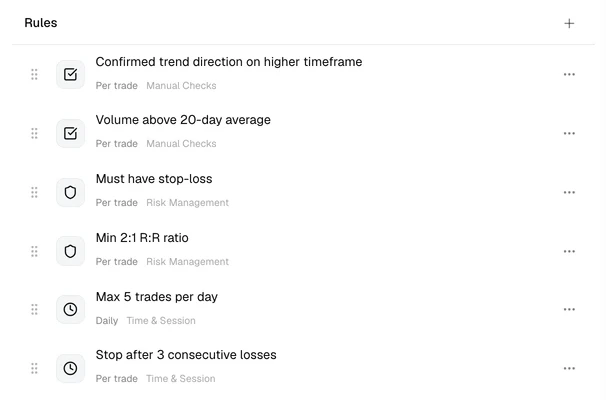
In Tradeways, each strategy holds its plan in two parts. The notes hold the written plan as rich text or an uploaded PDF, in up to 20 notes per strategy, each in its own tab: for example one for the plan and one for setup examples. The rules hold the checkable lines: up to 50 per strategy, in five categories (time and session, risk management, instruments, performance, and manual checks).
Rules of a demo strategy. Each rule shows its scope (per trade or daily) and its category. The two manual checks are confirmed by the trader; the others are checked from the trade record. Demo data.
Most lines of the example plan map to a rule type directly: must have stop-loss, minimum R:R ratio, maximum position size, trading hours, maximum trades per day, stop after consecutive losses, and maximum daily loss. The setup conditions become a manual check with your own label.
Rules are evaluated only for trades linked to the strategy. Link trades from the trade log or trade detail page, assign the strategy to existing trades in bulk, or set it as an account default so imported trades receive it automatically. Automatic rules read the trade record, so a stop-loss rule fails when the trade has no stop level recorded and an R:R rule is not applicable without a target. Stop-loss and take-profit levels are recorded on the trade detail page, and a change there refreshes the Review checklist.
On the Review page, each trade gets a checklist of automatic results and manual checks, and the overview shows compliance for each selected strategy. While a trade is unreviewed, an unchecked manual rule stays open; when you mark the trade reviewed, every unchecked manual rule counts as failed. Before a session, the Pre-Trade Check widget shows your time and session rules for the current session and lets you tick the day's manual checks.
To try a rule change, set a rule inactive instead of deleting it. Inactive rules are skipped in the checks and keep their settings, so you can switch them back on. The strategies documentation lists every rule type and scope.
A plan and its compliance describe how you traded. They do not predict results or make a strategy profitable. Read the Tradeways risk disclosure before using your trading history to support a decision.