Trading expectancy: calculate and check your sample
Calculate trading expectancy from a defined set of trades. Work through costs, zero-result trades, and calculator inputs, then save a reproducible journal note.
We use cookies, including analytics, to improve Tradeways. · Privacy
Historical trading expectancy is the average result per trade in a defined sample. Add the results after costs and divide by the number of trades. A positive value describes a positive average in that sample. It does not establish what the next trade, or the next sample, will return.
To check your number, keep the account, strategy, period, and unit consistent. This example shows how to handle costs and zero-result trades in the trading expectancy calculator, then record what you calculated in your journal.
Use closed trades whose results you can verify. Include every trade that meets the sample definition, including those with a zero result.
You can express the result in one account currency or in R-multiples. For a per-trade R calculation, divide each trade's result by its own initial risk before averaging. Do not divide a currency total by an arbitrary risk amount and label it average R.
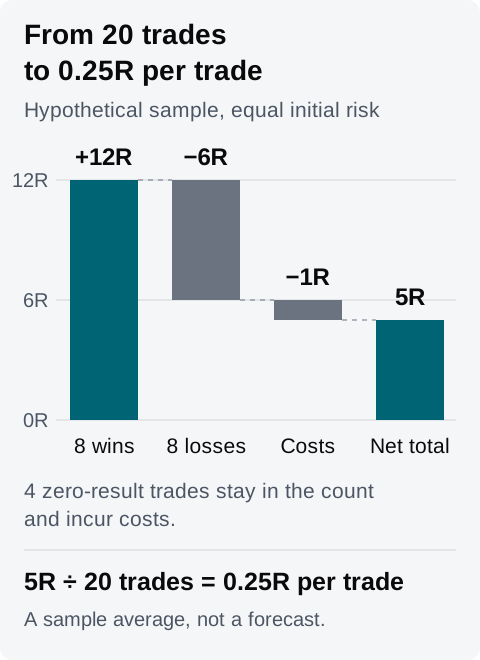
Here is a hypothetical sample of 20 closed trades. Each trade has the same initial risk, and each costs 0.05R. The counts are chosen to make the arithmetic easy to check; 20 trades is not a validation threshold.
Result before costs
Number of trades
Combined result before costs
+1.50R
8
+12.00R
−0.75R
8
−6.00R
0R
4
0R
Total
20
+6.00R
The cost is 20 × 0.05R = 1R. Subtract that once: 6R − 1R = 5R after costs. Divide by all 20 trades to get 0.25R per trade.
Hypothetical calculation. The four zero-result trades add no gross R, but they remain in the count and each incurs the example's 0.05R cost.
If the recorded trade results already include costs, add those net results and divide by 20. Subtracting the same fees again would understate the average.
The calculator combines win rate, average win, average loss, and cost per trade. It sets the loss rate to 100% minus the win rate, so its second group contains every non-winning trade. When your sample has zero-result trades, include them in that group's average.
For the example, the eight positive trades give a win rate of 8 ÷ 20 = 40%. The other 12 trades contain eight losses and four zeros. Their combined gross loss is 6R, so the calculator's Average loss input is 6R ÷ 12 = 0.50R. The average of the eight losing trades alone is 0.75R, but that is not the input to use with this calculator's 60% non-winning group.
The calculation is 0.40 × 1.50R − 0.60 × 0.50R − 0.05R = 0.25R per trade. Multiplying by 20 gives the same 5R total as the records above.
This example groups trades by their result before costs because it subtracts costs separately. If you use results after costs instead, group and average those net results, and set the separate cost input to zero. Do not copy a journal's win rate without checking how it classifies breakeven trades.
Keep the payoff and cost inputs above, but change the win rate to 30%. The calculated average becomes 0.30 × 1.50R − 0.70 × 0.50R − 0.05R = 0.05R per trade. A change of ten percentage points reduced the modeled average by 0.20R.
That is a hypothetical scenario, not a second observed sample. Write down which inputs came from records and which you changed manually.
The calculator's projected total multiplies the average by the trade count you enter. Changing the count from 20 to 200 scales the projection from 5R to 50R. It adds no trade records and supplies no evidence that the average will persist. Neither a projection nor a positive historical average tells you what position size to use.
Use the records behind the number to make the review reproducible:
Select the account and set the global filter to your strategy, completed period, and closed trades. Check the timezone used for the period.
Open the Trade Log and clear any local filters that would exclude matching records. Inspect the trade results and fees before copying inputs.
If you compare dashboard widgets, check their account pins and filters. Layer combines a widget filter with the global filter; Replace gives the widget its own filter. Different scopes can produce different numbers from the same account.
Keep the display unit consistent. When using R, check the risk basis used for each figure before comparing it with your per-trade calculation. A matching label alone does not prove the calculations use the same denominator.
Save the sample definition, calculation, and unresolved questions in a journal page or the relevant weekly entry. Link the trades you inspected and wait for the saved state.
A blank or partial widget value is not zero. Check its missing inputs before interpreting it. The widget documentation explains the account, filter, and data states.
For the hypothetical sample above, a completed note could read:
Practice account, Strategy A, 14–18 September 2026, Europe/Zurich. I included all 20 closed trades matching that scope. All have the same initial risk in this example.
Before costs: eight trades at +1.50R, eight at −0.75R, and four at 0R. Gross total 6R. Costs 1R. Net total 5R, or 0.25R per trade.
Calculator inputs: win rate 40%, average win 1.50R, average non-winning result −0.50R entered as a 0.50R loss, cost 0.05R, count 20. The calculator agrees with the record total. Its 60% loss-rate label includes the four zero-result trades.
I also tried a hypothetical 30% win rate with the other payoff inputs unchanged. That returned 0.05R per trade. I have not observed that scenario or established that either average will persist.
Use the Tradeways journal to save your own sample and the records behind it. For the limits of using historical results in trading decisions, read the risk disclosure.